
Download Professional Data Restoration Utility – free Windows data recovery tool
Overview
Professional Data Restoration Utility is a free Windows‑based recovery program created by Drive Recovery Software. Positioned in the Development & IT category under Backup & Cloud Storage, the tool focuses on restoring critical office documents—such as XLS, XLSX, DOC, DOCX, PPT, and PPTX—as well as valuable image files that have been lost due to software glitches, hardware failure, or accidental deletion. What sets this utility apart from many competing products is its emphasis on simplicity: users do not need a background in IT or data forensics to retrieve their lost files.
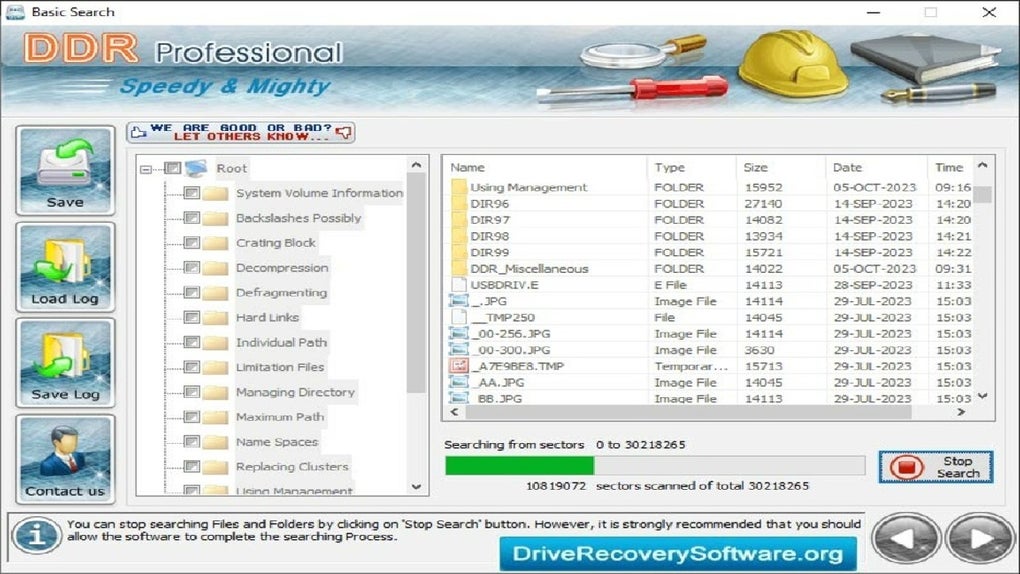
The interface guides you through a step‑by‑step wizard, automatically scanning the selected storage media, presenting recoverable items, and allowing you to save them to a safe location. Because it is engineered for Windows 10, 8, and 7, the software integrates seamlessly with the native file system, ensuring that recovered data retains its original format and metadata. Whether you are a small business owner who has just experienced a hard‑disk crash, a student who accidentally erased a semester project, or a photographer looking to salvage a batch of corrupted images, Professional Data Restoration Utility offers a trustworthy, no‑cost solution that eliminates the need for expensive professional services.
Its lightweight footprint (under 30 MB) and rapid scanning engine make it an ideal first‑line defense against data loss, while the optional premium upgrade provides deep‑scan capabilities for severely damaged drives.
Key Features
- Free core recovery engine – restores common office file types (DOC, DOCX, XLS, XLSX, PPT, PPTX) without charge.
- Fast image reconstruction – specialized algorithms target JPEG, PNG, BMP, and RAW files, delivering quick results even after hardware failures.
- Intuitive wizard‑driven UI – step‑by‑step guidance removes the need for technical expertise.
- Selective file preview – view thumbnails and file contents before committing to recovery, reducing unnecessary data duplication.
- Deep scan mode (premium) – digs into fragmented sectors and corrupted file tables for advanced users willing to pay for extra power.
- Secure saving location – forces you to choose a different drive for recovered files, protecting the source media from further damage.
- Lightweight installation – less than 30 MB installer, minimal system impact, and automatic updates to keep the engine current.
- Multilingual support – interface available in English, Spanish, French, German, and Italian.
- Comprehensive log file – generates a detailed recovery report for audit or troubleshooting purposes.
Installation, Usage & Compatibility
Installing Professional Data Restoration Utility is a straightforward process that can be completed in under five minutes. Begin by downloading the installer from the official Drive Recovery Software website—ensure the link uses HTTPS to guarantee a secure download. Once the file (named PDUtility_Setup.exe) is saved, double‑click to launch the wizard. The first screen presents the End‑User License Agreement; accept the terms, then click “Next.” The installer will automatically detect your Windows version and suggest the appropriate installation folder (default: C:\Program Files\Professional Data Restoration Utility). After confirming the path, click “Install.” The program copies the necessary files, registers required system services, and finishes with a “Launch Application” button.
Upon first launch, the main dashboard displays three primary actions: Quick Scan, Deep Scan, and Settings. For most users, the Quick Scan option is sufficient—simply select the drive or partition that experienced data loss, click “Start Scan,” and watch the progress bar as the engine surveys the file system. Detected files appear in a sortable list; you can preview images or open document snippets directly from the interface. To recover, tick the desired items and choose a destination folder on a different physical drive (this prevents overwriting unrecovered data). Click “Recover,” and the utility copies the files while preserving original timestamps and metadata.
Compatibility is limited to 64‑bit and 32‑bit Windows operating systems from Windows 7 onward, including Windows 10 and Windows 11. The software does not run on macOS, Linux, Android, or iOS devices. System requirements are modest: a minimum of 2 GB RAM, 500 MB of free disk space for the program itself, and a CPU of at least 1 GHz. Because the utility accesses low‑level disk structures, it must be run with administrator privileges; the installer automatically requests elevation during setup. Users who enable BitLocker or other full‑disk encryption should decrypt the volume first, as the scanner cannot interpret encrypted sectors.
Pros, Cons, FAQ & Final Verdict
Pros
- Completely free core version with no hidden fees.
- Fast and reliable recovery of common office documents and images.
- User‑friendly wizard eliminates the learning curve.
- Secure saving mechanism protects source media from further damage.
- Lightweight footprint and quick installation.
Cons
- Deep‑scan functionality requires a paid upgrade.
- Limited to Windows; no native macOS or mobile versions.
- Cannot recover files from severely corrupted RAID arrays without extra tools.
- Requires administrator rights, which may be restricted in corporate environments.
Frequently Asked Questions
Is Professional Data Restoration Utility truly free?
Yes, the base version is completely free and includes recovery for the most common file types. Advanced deep‑scan features are offered as an optional paid add‑on.
Can I use the tool on a USB flash drive?
Absolutely. The utility can scan any removable storage that Windows recognizes, including USB sticks, external SSDs, and memory cards.
What happens if I recover files to the same drive that has the loss?
The program will warn you and block the operation. Saving recovered data to a different physical drive prevents overwriting sectors that may still contain recoverable information.
Does the software support encrypted drives?
No. Encrypted volumes must be decrypted before scanning, as the utility cannot interpret encrypted file tables.
How often are updates released?
Drive Recovery Software releases minor updates every 4‑6 weeks to improve scan algorithms and add support for new file formats. The installer includes an auto‑update feature that notifies you of new versions.
Final Verdict: Professional Data Restoration Utility delivers exactly what its name promises—a reliable, free solution for retrieving lost documents and pictures on Windows PCs. Its intuitive design makes it accessible to non‑technical users, while the optional deep‑scan upgrade gives power users the ability to tackle more stubborn data loss scenarios. If you need a quick, secure way to recover office files without spending a fortune, this utility should be at the top of your download list. Download now and restore confidence in your digital workflow.







